
Recruiting in the IT industry – Part 1
This is the first of a three part collection and is adapted from a UMUC Study Group White paper:
“Recruiting and Retention – A Strategic Guide to Managers”
Overview
Organizations must always have successful recruiting and hiring strategies in place to stay ahead of the game. DoubleStar (2002) states that great hiring begins and ends with great hiring practices and well-trained recruiters. Thus, after determining the vacancies in an IT organization, it is important to develop a method for recruiting qualified candidates. During the recruitment process, it is important to attract the best candidates by using the best methodologies available. When establishing the processes of recruitment, the following should occur in order:
- Determine who will serve as recruiters in the organization
- Establish a method for attracting the best candidates
- Use reliable selection methodologies based on open IT positions
- Establish Selection Processes
- Set guidelines for a model interview
- Select interviewers based on IT positions being represented
- Ensure interviewers are properly qualified and are using model interview guidelines
- Monitor the full recruitment process and perform follow-up

Select Top-notch Recruiters
The first step of the recruitment process is selection of top-notch recruiters. According to Sullivan (1999)
“Managers need to do all recruiting; managers and team-leaders play a major role in the success of the business; they are decision-makers and when they are outside the firm, they serve as “ambassadors” for the firm.“
Managers are typically the ones in IT companies who usually represent the company to the customers, clients, and partners through marketing, sales, proposals, presentations and such. Furthermore,
“The manager’s role also requires them to be on the leading edge of knowledge and business practice” (Sullivan, 1999)
Which is even more reason for the managers to serve as recruiters.
With this in mind, it is also important to note who is best to conduct the model interview. It may be someone other than the manager, who has direct experience and expertise in the field and/or position being filled. Clearly, when it comes to filling IT positions.
“The best should be used to recruit the best” (DoubleStar, 2002)
In the armed forces, only the top 10% of performers are asked to join the recruiting team. Why? Because their research shows the best, current performers recruit the best future performers. Moreover, other research consistently shows the best workers want to work for the best leaders. It is great practice to have your best talent fully engaged in recruiting new talent.
“While the Web will help you find candidates faster and cheaper, it will not help you improve your success at evaluating, or recruiting and hiring talent. To do that, improve your practices, processes, and people.” (DoubleStar, 2002).
Attract the Best Candidates
The next important process of recruitment is to establish a method for attracting the best candidates. There are several ways to attract IT job applicants, but only a few successful recruiting methodologies attract the best candidates. When determining marketing processing for attracting the best applicants in the IT market, it is important to vary from traditional methods of recruitment and advertising and focus on new competitive-edge, technologically advanced marketing methods.
“The Web has given birth to new recruiting media and tools that make some aspects of the recruiting process faster and less expensive” (DoubleStar, 2002).
Some of the growing recruiting media and tools are electronic job boards and Web-based applicant management systems.
“Job boards have effectively improved upon the ‘help wanted’ classified ad model for job advertising and application” (DoubleStar, 2002).
Furthermore,
“Some of the Web-based applicant management systems bring speed and process efficiency to previously slow and manually burdened hiring operations” (DoubleStar, 2002)
Which included searching through countless amounts of paper resumes in search of keywords that match the open positions requirements. In general,
“Every growing company needs to subscribe to one or two job boards” (DoubleStar, 2002)
And if funds permit establish a web-based applicant management system, which in the long run the benefits will outweigh the initial costs.
Use Reliable Selection Methodologies
The third suggested recruiting step includes reliable and efficient selection of candidates. One proven methodology for effective recruiting selection is investing in electronic recruiting (e-recruiting) software. According to Emery (2001):
“E-recruiting software is a collaborative, real-time process. E-recruiting streamlines candidate searches which lead to much cheaper recruiting methods than traditional methods, such as recruiting agencies that charge 20 percent to 30 percent of the candidate’s starting salary to find qualified candidates.” (Emery, 2001)
E-recruiting saves corporation money, time and resources, since all applying candidates’ resumes go into a database for categorizing, matching to multiple openings, followed up by e-mails to the appropriate hiring managers.
“Similar to e-recruiting software, applicant-tracking software is another proven method for selecting the best candidates for open job positions. Applicant-tracking software offers complete talent management at your fingertips.
Furthermore, most systems are scalable to meet any given corporation’s needs to allow managers to post jobs, track relationships with notes, and e-mails as follow-ups.
With applicant-tracking software organizations are able to free up personnel resources for other company-oriented tasks, while possessing the ability to reach out and identify prospective candidates with minimal effort (Artemis, 2002).
Establish Selection Processes
After successfully attracting qualified job candidates and using reliable selection methodologies, a choice will need to be made to determine who to hire. Unfortunately, often the people that process the applications, answer applicants’ phone calls, set up interviews, perform the interview and provide feedback to the applicants are highly likely to be complete novices.
“In addition, whoever performed the selection process before is gone or not credible for advice and guidance.” (Serva et al, 1998).
“Furthermore, the relationship between IT and Human Resources (HR) may not be harmonious.” (Agarwal & Ferratt, 2002).
To overcome these problems with the selection process, successful IT leaders are working hard at bridging the differences between IT and HR.
“A best in class” approach of successful organizations is to create a dedicated IT HR person responsible for assisting with the hiring of IT personnel (Agarwal & Ferratt, 2002).
This individual can bridge the differences between IT and HR and can be a knowledgeable and credible source to assist with the recruitment and selection process.
The steps that are undertaken during the selection process will vary from organization to organization. Generally the selection process follows the course of:
- Narrowing down the applications
- Interviewing the remaining applicants
- Narrowing the applicants further
- Checking references
- Performing a background check
- Testing
- Making a job offer
- Negotiating compensation.
Steps may be repeated to gather additional information or omitted from the process.
Some ideas and processes should be universal for the selection process, regardless of organization or the exact steps used during the selection process. The selection process that will be used should be clearly defined, understood, communicated and conform to the parameters of the organization. Care should be taken to inform others involved in the process of their duties and responsibilities. Understanding the process that will be used and the process parameters of the organization are important to avoid problems, such as making a job offer only to discover that proper recruitment or a background check was not performed, as the organization requires.
All documentation on the selection process should be maintained, including reasons for non-selection. This information can be used to support the hiring decision in case a non-selected candidate challenges the decision and/or a selected candidate makes claims that the details of employment were incorrectly presented. All interviewers should have and follow an interview script/worksheet that is used during interviews.
“Notes on the interview and personal observations of the candidates should be recorded.” (Dudek, 1997).
References should be checked to ensure the candidates’ work histories are correct. If a background check is performed, only items that are pertinent to the position should be reviewed and considered. Gathering additional information may unduly influence the selection process. If testing is to be used in the selection process, determine why testing is needed. Testing should be limited to skills such as technological knowledge or problem solving. Make sure that the test is appropriate and validate the test before administrating it to candidates.
Throughout the selection process, the organization should be “sold” to job candidates.
“An effort should be made to “articulate and communicate the IT organization’s overall vision, culture, and values to prospective hires” (Agarwal & Ferratt, 2002).”
The only way this can successfully be achieved is with the good interpersonal and management skills of those involved in this process.
“Candidates should be presented with significant competitive differentiation elements that the organization possesses such as exploiting the overall visibility and reputation of the larger organizations, using market data to peg compensation, and offering the opportunity to work with state-of-the-art technologies.” (Agarwal & Ferratt, 2002).
Recruitment and Retention Strategic Star (figure 1) lists various other items that can be communicated to the candidates to sell the organization to the candidate.
When selecting candidates, they should possess both technology and business skills.
“IT professionals whose major activities focus on successfully applying IT to business problems will require a stronger set of business knowledge and skills. Those whose major focus is the development and integration of the technological infrastructure will require a stronger set of technical skills.” (Agarwal & Ferratt, 1998).
“IT professionals responsible for managing people and projects should possess interpersonal and management skills.” (Agarwal & Ferratt, 1998).
“Furthermore, skills such as communication, teamwork, and the ability to understand technological trends and learn new technologies are critical attributes of IT professionals.” (Agarwal & Ferratt, 2002)
The selection process should attempt to find candidates who best possess these skills and will best fill the position.
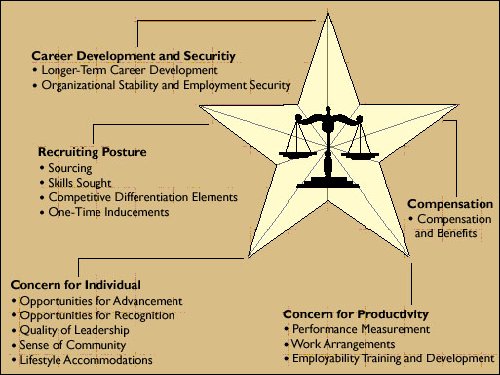
Figure 1 – Recruitment and Retention Strategic Star (Agarwal & Ferratt, 2002)
A successful selection process will bridge the differences between the IT and HR departments allowing each to meet their individual goals in candidate recruitment. The process selected should be a clear roadmap for all of those involved to avoid inconsistencies and confusion. Each step of the process should conform to the core ideas and philosophies that the organization has agreed upon and chosen.
Documentation of every aspect of the selection process is integral to its success. In addition, care should be taken not to add more steps than necessary to select qualified candidates. Throughout the selection process, while implementing all of these concepts, it is important to make the candidate desire to be a part of the organization.
Furthermore, the final candidate pool should be comprised of only individuals who possess technology skills coupled with business skills. If these basic concepts are applied to the selection process, the chance that the candidate selected for the position will be a successful employee in the organization greatly increases.
Establish Guidelines for a Model Interview
Establishing guidelines for a model interview is the fifth step in the recruiting process which ties in with the selection process. To establish guidelines for a model interview, it is first important to make sure interviewers are selected based on the position being filled. Having an interviewer who possesses hands-on knowledge about the position being filled is of the utmost importance. Hence, similar to selection of the recruiter, it is usually the role of the proposed hiring managers to perform interviews.
Furthermore,
“Making managers recruit and perform interviews improves the quality of their decision-making; managers can stay in touch and on the edge of knowledge in a variety of ways but one of the best is to keep them current by making them go out and do their own recruiting” (Sullivan, 1999),
Lastly, when using direct hiring managers as interviewers, candidates are able to receive direct contact and interaction with their possible future supervisors, thus providing them with some insight into conformity of their personality with their potential supervisors’ personalities.
When choosing managers to perform both recruiting and interviewing it is important to remember the following:
“Managers can’t do it alone” (Sullivan, 1999).
Managers should be effectively prepared for both recruiting and interviewing efforts.
“In order for interviewing managers to be the most effective, they must have and utilize a standard set of tools and guidelines for establishing the model interview. Such tools should provide critical behavioural interviewing monitoring techniques and teach interviewers how to assess the technical skills and abilities of an interviewing candidate.” (Young, 2002).
“ The way you (and others at your firm) represent your firm and handle the interaction with the candidate throughout the entire employment process will greatly affect the candidate’s decision when determining whether or not to accept a position. The whole procedure should be conducted in a smooth flowing professional manner” ( Client Interviewing Tips, n. d.).
Some simple guidelines that should be followed to create the model interview are:
- Do not accept phone calls or allow any other interruptions during the interview.
- Know the specific reason(s) causing candidates to want to change jobs, and make sure to explain how coming to work for you will correct the problem(s).
- Be enthusiastic and sell the opportunity at all times.
- Answer all questions in an honest, open, straightforward manner.
- Be time sensitive during all of the dealings with the candidate especially when telling a candidate something will be done by a certain date.
- Any written material about the firm, benefits, and location should be given to the candidate.
- Be prepared for the interview by having any relevant information easily available, i.e. business cards, questions, candidate’s resume, etc.
- Increase ratio of interviews to hires ( Client Interviewing Tips, n. d.).
Monitor the Recruitment Process
The last and final recommended step of the recruitment process is effective monitoring and documenting of the full recruiting process. Keep in mind that
“On average, IT has a high per employee recruitment cost” ( Goth & Blank, 1999).
Although the IT employee pool may be large,
“The knowledge base is infinitesimal, and the experience set, superficial” in many cases ( Reisman, 1999).
Over 90% of companies have not documented their recruiting processes. Often, companies have as many different hiring processes as they have hiring managers. Furthermore, most hiring is delegated to first line managers. These are, by definition, the least experienced leaders and the most likely to make mistakes in the difficult process of assessing and hiring talent.
“Creating a documented, replicable, and measurable recruiting process is a fundamental requirement for establishing company-wide recruiting practices that can be improved with each hiring transaction.” ( DoubleStar, Inc., 200
Documentation is part of any successful process in order to ensure it is repeated and revised according to lessons learned during the process implementation. Not doing so, would invalidate the process as a whole.
Addressing Hiring Laws
During the hiring process:
- Illegal discrimination must be avoided
- The applicant’s privacy rights respected
- Legal rules for hiring foreign and young workers followed
- Promises that cannot be kept should not be made.
There are a variety of local, state and federal laws that govern what you can and cannot do during all phases of the hiring process, which includes advertising, interviewing, investigating, testing and selecting new employees ( Hiring Employees FAQ , 2003). There are at least six US federal laws as summarized in Table 1 (next page) that need to be followed throughout the hiring process concerning illegal discrimination alone.
|
Law |
Applies to employers with at least x employees |
Protects against discrimination based upon |
| Civil Rights Act of 1964, Title VII | 15 | Race, colour, gender, national origin, and religion |
| Equal Employment Opportunity Commission Age Discrimination in Employment Act of 1967 | 20 | Upon age against people who are age 40 or older |
| Americans with Disabilities Act of 1990 | 15 | Disabilities, the perception of disabilities, or association with people with disabilities |
| Immigration Reform and Control Act of 1986 | 4 | National origin or citizenship |
| U.S. Bankruptcy Code – Section 525 | All | Bankruptcy history or bankruptcy claim filing status |
| Civil Rights Act of 1966 | 1 or hires another person to perform any kind of work or services | Race or colour |
Table 1 – Federal hiring laws (Major Laws Impacting the Hiring Process, 2002)
Job Advertising
There are basic steps that can be followed for successful conformance with the various and numerous local, state and federal laws. Open positions should be advertised, even for private employers that are not required to do so. Advertising open positions may increase the number of job candidates, may result in a higher qualified candidate being found, and will also assist in avoiding unintentional discrimination. Unintentional discrimination may occur if new employees are hired based solely on referrals from current employees ( Hiring Employees FAQ , 2003). In this scenario, it is possible that only individuals of one race, colour, gender, national origin, and religion are hired, even though this is not intended.
Position requirements that may be considered discriminatory should also be included in the advertisement. For example, if the position requires work on Saturday, when individuals of some faiths may not be able to work, it is better to state the requirement in the advertisement. This may help avoid the perception of discrimination if the requirement is specified to the job candidates later in the hiring process. Make sure the requirements specified are accurate. If there is some flexibility with the requirements for qualified candidates, state so in the advertisement. For example, if the work schedule could be adjusted so that a candidate did not need to work on Saturday, include this in the advertisement.
Application & Interviews
Care should also be taken on the application and during the interview to ensure that illegal discrimination is avoided and that privacy rights are respected.
The Equal Employment Opportunity Commission (EEOC) has suggested that an employer consider the following three questions in deciding whether to include a particular question on an employment application or a job interview:
(1) Does this question tend to have a disproportionate effect in screening out minorities or females?
(2) Is this information necessary to judge this individual’s competence for performance of this particular job?
(3) Are there alternative non-discriminatory ways to secure necessary information? ( Hiring Employees FAQ , 2003)
By applying these three rules, it is possible to gather information on a candidate without illegally discriminating or infringing on their privacy rights. For example, rather than asking a candidate if they are married, which may illegally discriminate and infringe on their privacy, ask the candidate if they are married to anyone currently employed at the organization, if nepotism is not allowed ( Hiring Employees FAQ , 2003). Or rather than asking a candidate’s age or date of birth, which may illegally discriminate, ask the candidate if they are at least the minimum age required for the job. If specific information is needed on a job candidate that may be considered private or could be perceived as discriminatory such as date of birth, wait until the employee has formally accepted a job offer to gather the information (Employee Hiring Laws: Employment Application and Job Interview, n. d.).
Avoid asking questions that obtain information that could be used illegally to discriminate. For example, questions that gather information in the “Protects against discrimination based upon” column of Table 1, requiring pictures of job candidates or asking for the physical attributes of candidates, should be avoided.
“Employment applications have been the focal point of discrimination lawsuits against employers” (Employee Hiring Laws: Employment Application and Job Interview, n. d.).
Make sure your application does not discriminate. Periodically review the application to ensure that it does not discriminate and/or infringe on privacy rights and the information on the application meets the three EEOC guidelines.
“Before the interview, there should be policies that compensate employees for work that set basic compensation levels, incentive pay systems, and bonus systems.” (Agarwal & Ferratt, 1998).
Information on the compensation policy and employee benefits should be available at the interview. Use this material to answer job candidates’ questions and to avoid making promises that cannot be kept. Do not promise regular or future promotions, ensure job security, make projections of the state of the business, or exaggerate the current state of the business. Use facts and honesty. Doing otherwise can result in an employee being able to sue if the promise does not come true, based on an implied contract ( Hiring Employees FAQ , 2003). Concentrate the interview on the tasks that the candidate will need to perform and the skills that they need to possess. In addition, questions that infringe on privacy or that illegally discriminate should not be asked of job candidates before or after an interview, as these types of questions are inappropriate at all times.
Background Check
When investigating job candidates through the use of a background check, consent from the candidate must be given and the background check should be relevant to the position. In addition, it may be necessary to have the candidate ask for school records to be provided, as educational records are confidential. A candidate will also need to provide permission for a credit report to be reviewed as part of the background check. If the candidate is eliminated from consideration based on the credit report, the candidate must be provided a copy of the report and a chance to challenge the report as specified in the Fair Credit Reporting Act ( Hiring Employees FAQ , 2003).
To avoid infringing on privacy, a military record will only disclose name, rank, salary, duty assignments, awards and duty status. If more information is needed, the candidate will need to provide consent and a Freedom of Information Act request must be made (Employment Background Checks, 2000). Under limited circumstances, additional information will be provided. There are local and state laws that dictate how a criminal record can be used in hiring and they should be referred to before undertaking a background check including a criminal check. Use of Workers’ Compensation records and medical information is limited; it can only be used to determine if a job candidate will be able perform the required duties ( Hiring Employees FAQ , 2003).
Testing
There are a variety of tests, such as skills tests, aptitude tests, psychological tests, personality tests, honesty tests, medical tests and drug tests that may be administered to job candidates. Avoid aptitude, psychological, personality and honesty tests as these often can illegally discriminate or infringe on privacy rights. Medical tests may occur after a position has been offered to a candidate as a condition of employment, but a medical test must be performed on all new employees for a position or else illegal discrimination is occurring ( Hiring Employees FAQ , 2003).
The laws concerning drug testing vary from state to state and the pertinent state law should be referred to before requiring drug testing ( Hiring Employees FAQ , 2003). Skill tests are allowed. However, skills that are tested must be required for the job. For example, an employer cannot test for C++ skills if they will not be used.
Legal rules for young workers and foreign workers
In addition to the aforementioned hiring laws that must be followed, there are special rules concerning young workers and foreign workers hired for IT work. Generally, employees over eighteen years old can be hired without restrictions on their work hours. Sixteen and seventeen year old employees can also work without restrictions on their work hours at non-hazardous jobs. Employees younger than sixteen can work at non-hazardous jobs, but there are restrictions on the number of hours and the times they can work ( Hiring Employees FAQ , 2003). Furthermore, there may be additional state and local laws dictating the work of young workers.
During the hiring process, non-immigrant foreign job candidates should be treated as all other applicants. To hire a non-immigrant foreign job candidate for a professional IT position an H-1B visa will be needed. To obtain an H-1B visa the job must be a professional position that requires, at a minimum, a bachelor’s degree in the field of specialization. The H-1B visa allows individuals to stay in the US for a maximum of six years ( H1B FAQ, 2003).
By following the above constraints during the hiring process, illegal discrimination can be avoided and the applicant’s privacy rights respected. The employer will be complying with hiring laws, and will be better able to defend against any illegal hiring allegations. In addition, the overall recruitment process will be improved as less legal problems will arise and because future employees were treated with respect and consideration during their recruitment and selection.
Copyright Project Perfect